Max GO Watch Review: What It Tracks, What It Hides (2026)
Quick answer: The Max GO is a 1.69-inch touchscreen watch from Personify Health (formerly Virgin Pulse) that works as a fitness tracker for your employer's wellness program. It isn't sold on Amazon. It syncs five stats (steps, sleep, active minutes, workouts, calories), hides blood oxygen and stress while connected, and only stores the previous seven days of data.
Do you need one? No. According to Personify Health's support docs it runs up to 8 days on a two-hour charge and can be worn swimming up to 50 meters, and disconnecting it wipes the watch. You don't have to use one: any Fitbit earns Personify points for steps and activity minutes, plus sleep on supported devices — the fullest integration there is — while Oura earns steps, sleep and workouts, and Polar and WHOOP earn only workout or sleep credit. If your company is giving you a Max GO, use it. If you'd be paying for one, buy a Fitbit instead.
If you landed here, there's a decent chance your company's wellness program just told you the Max Buzz on your wrist stopped syncing on July 1, and the replacement is something called the Max GO. Search for it and you get a Zendesk help center, a couple of eBay listings and a TikTok tag. No review. No spec page you'd actually call a spec page. So this is that page: everything Personify Health has published about the Max GO, in one place, plus the question the help center never quite answers — do you need the thing at all, or does the tracker already on your wrist count?
One thing up front. We haven't strapped a Max GO on. Personify doesn't sell it at retail, so we can't order one the way we order every other band on this site. Every spec below is quoted from Personify Health's support articles, and each one is listed at the bottom with the date it was last updated. Where we give an opinion, it's labeled as one.
- What it is: Personify Health's own touchscreen watch that works as a fitness tracker, issued through employers since November 2024 and part of the same Max line as the retired Max Classic and Max Buzz
- Best for: someone whose company hands them one for free and who just wants the points program fed without babysitting a third-party account
- Biggest catch: connect it to Personify Health and blood oxygen, stress, weather and music vanish from the watch; disconnect it and the watch's data is erased. It also only stores the previous 7 days of data, so it needs an app sync about once a week
- Do you need it? No. Fitbit, Garmin, Oura, WHOOP, Polar, Apple Health, Samsung Health and Health Connect all connect — with very different amounts of credit (table below)
- Our take: free from your employer, wear it. Paying for one, don't — a Fitbit earns more kinds of points and keeps all of its features
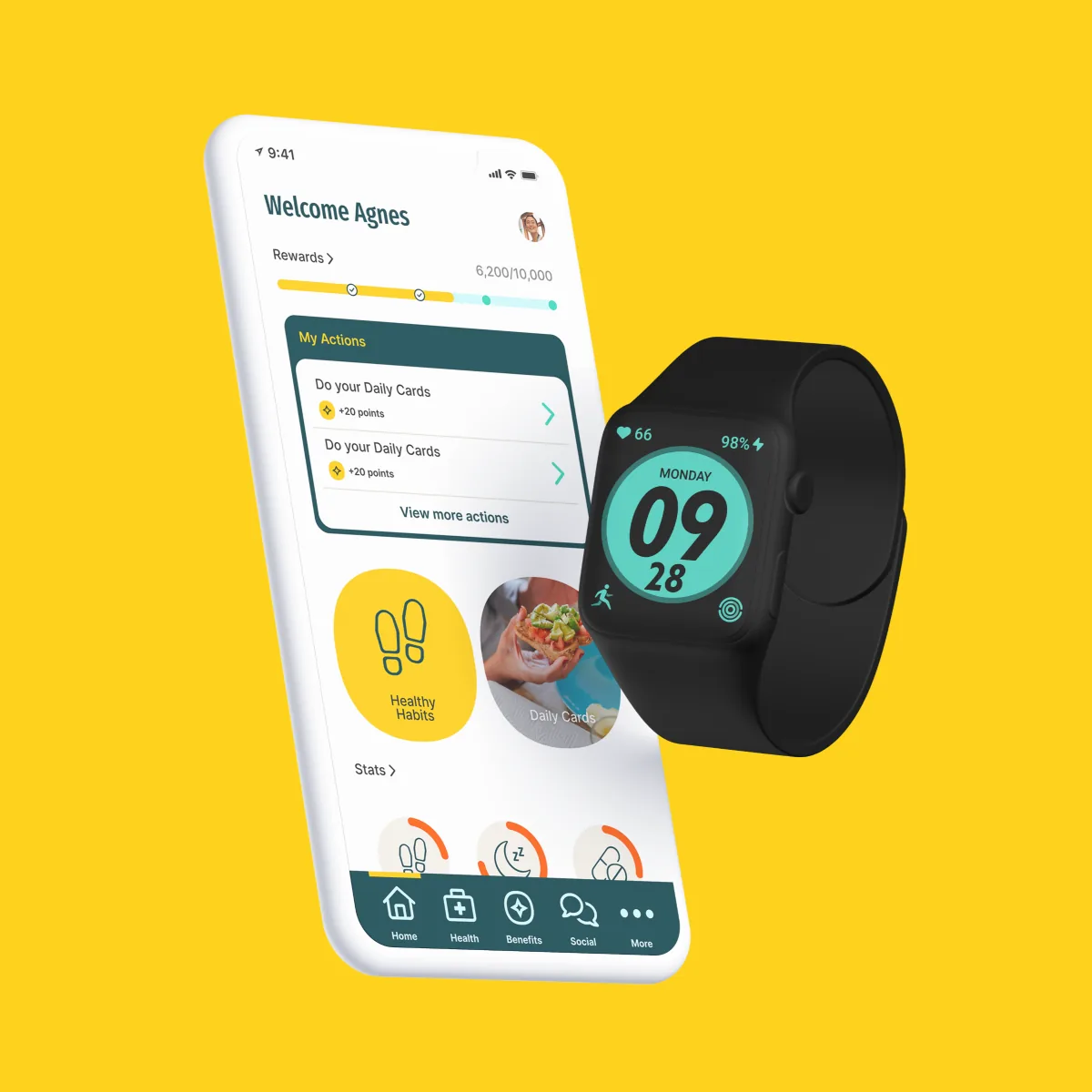
What is the Max GO watch?
Personify Health announced the Max GO on November 13, 2024, in the same press release as its Microsoft Teams app, describing it as "a significant upgrade from its predecessor tracking-only device" and pitching it as "similar to popular smartwatches yet more affordable."[24] Personify Health is the company that used to be Virgin Pulse; the Android app is still published under the com.virginpulse.virginpulse package name, which tells you how recent the rebrand is.
The hardware, according to Personify's Max GO Features article (updated September 24, 2026):[1]
- Display: a 1.69-inch color touchscreen with five brightness levels, a 5–20 second screen-on timer, and three watch faces (a data-heavy default, an analog face, and a third that shows activity duration, calories and how many times you've hit the 100-step hourly goal)
- Battery: built-in lithium cell, magnetic charging cable that plugs into any USB port, "just after two hours of charging you will be set to use it for up to 8 days"
- Band and sensor: a "bendable, rubbery strap" with a heart-rate sensor on the back
- Water: "you can even wear it while swimming and diving up to 50 meters" — that's the exact wording; Personify doesn't publish an IP or ATM rating
- Controls: one button on the right side; press twice for the Program List — Exercise, Exercise Record, Heart Rate, Breath Training, Sleep, Stopwatch, Alarm, Timer, Settings
- Notifications: SMS, email, calendar and call alerts, all switched on from the Personify Health app
From the companion Max GO Settings in the App article: a 12/24-hour clock toggle, eight device languages, lift-wrist-to-wake, up to 10 alarms, a water reminder that vibrates on an interval you pick, automatic walk/run exercise recognition, heart rate during exercise, and a sleep setting that "monitors overall sleep quality and breathing patterns."[5]
Now the things Personify Health doesn't publish, which is a long list for a watch: weight, case dimensions, strap width, and price. Resale listings describe it as a 44 mm case, but that's a seller's description, not the manufacturer's. Because there's no published lug width, we're not going to recommend replacement bands for it — anyone who does is guessing.
How do you get one? Through your employer's program, or by buying it inside the Personify Health platform. That second route comes straight from Personify's own support team, as quoted by a reviewer of the Personify Health app on the App Store on August 7, 2026, who had asked what to do with a Max Buzz that was about to stop working: "It is understandable how frustrating this process can be. However, there is no trade in policy that can be done and no negotiations. However, you can enter steps manually that your Max Buzz tracks or navigate to our platform store and purchase the Max GO."[25] So: no trade-in, no retail, no public price.
Is the Max GO a smartwatch or a fitness tracker?
Both, depending on who's describing it. Personify Health's launch announcement calls it a "wearable device" that is "similar to popular smartwatches yet more affordable," and its help center calls it a "smartwatch."[3][24] It has a 1.69-inch color touchscreen and shows SMS, email, calendar and call alerts.[1] But its job is a fitness tracker's: Personify's own Features article says it's "designed to track your fitness journey," it counts steps, active minutes, sleep, workouts and calories, and those five are all that reach the Personify Health app.[1][3] It's also not a full smartwatch once it's connected, because blood oxygen, stress, weather and music are hidden.[2] Think of it as a fitness tracker with a screen, built to feed an employer wellness program.
What does Max GO actually track (and what gets hidden when you connect it)?
This is the part the help center spreads across four articles, and it's the part that matters. There are three different lists: what the watch shows you, what reaches Personify Health, and what disappears.
What the watch itself shows
Swipe left from the watch face and you get the Main Data screen — step count, daily calories, active minutes. Swipe again for heart rate with the day's max and min; the Heart Rate program adds resting heart rate and its history over time. The Exercise menu covers a list of activities; pick Outdoor Run and the watch tracks duration, real-time heart rate, real-time pace, calories and distance on screen. Pick Pool Swimming and it asks you to type in how many minutes you plan to swim before it starts — Personify's article doesn't say what it records in the pool beyond that. Sleep shows total time and a color-coded breakdown of stages. Breath Training has three paces (3, 4.5 and 7.5 seconds). The stopwatch keeps up to 99 splits.[1]
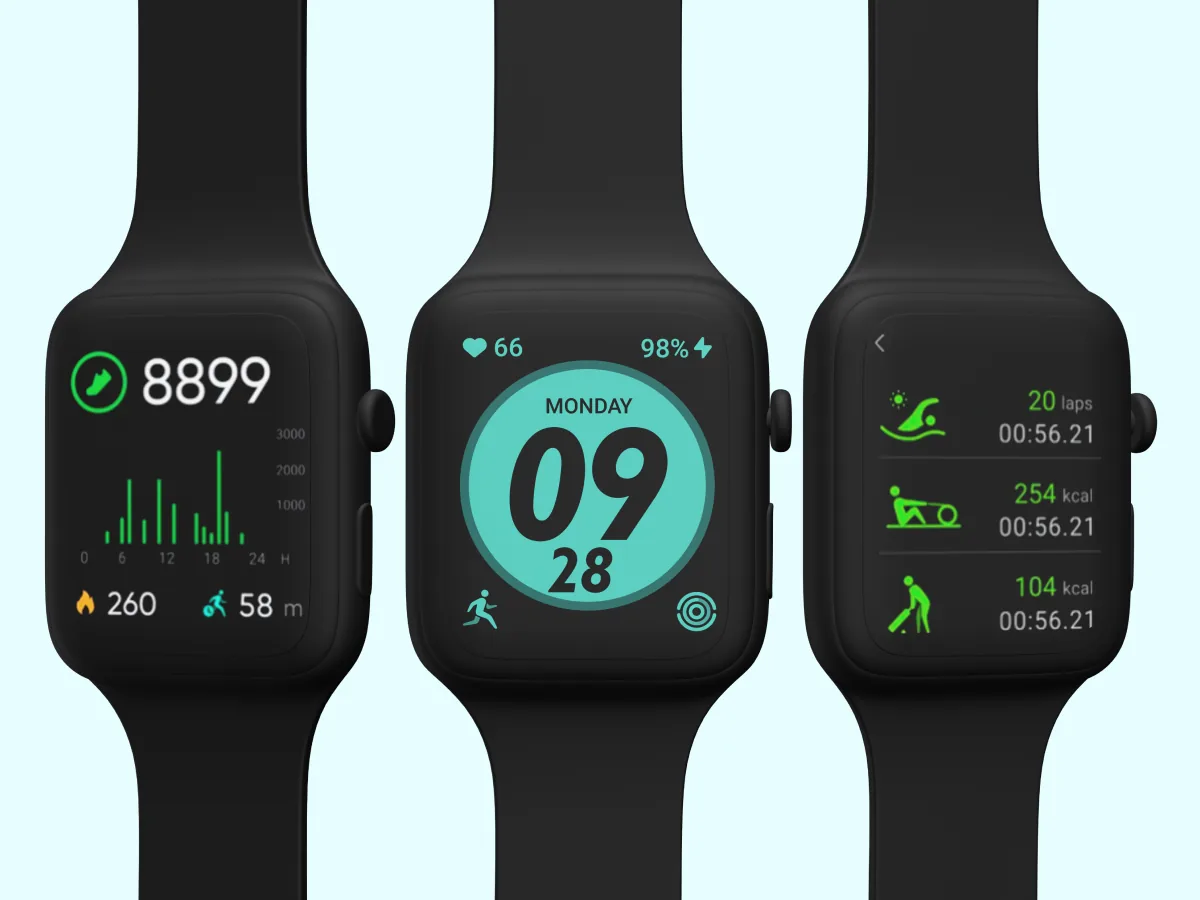
What actually reaches Personify Health: five stats
Personify's sync article is explicit. "While the Max GO smartwatch allows you to track different activities, the following stats can be synced with the Personify Health app: steps, sleep, active minutes, workouts, calories."[3] That's the complete list. Heart rate stays on the watch. To sync, you open the Personify Health app and pull down on the home screen.
That last sentence matters more than it sounds. Personify sorts devices into two buckets: ones that push data on their own (Fitbit, and anything routed through Validic — Garmin, Polar, Oura, Strava, Withings) and ones that only sync when you log into the app. Max GO is in the second bucket, alongside Apple Health, Health Connect and Samsung Health.[8] Two limits stack here. The platform rule is that Personify Health "only syncs activity data from the past 14 days," and on top of that Personify's tracker guide says the Max GO itself "only stores the previous 7 days of data."[26] That's the failure mode to avoid: go on vacation, don't open the app for two weeks, and roughly the first week of steps is gone along with its points.
What gets hidden: blood oxygen, stress, weather, music
The hardware can do more than Personify lets it. From the Max GO missing features article, updated September 17, 2026: "The Max GO device offers a range of features that are built into the watch, such as Weather, Music, Blood Oxygen and Stress. However, these features are not supported by the Personify Health platform." When the watch is connected to your account, "any features that are not integrated or supported by the platform [are] hidden from the device interface." They come back only "if the device is used independently (not connected to the platform)."[2]
Our read: since the only reason anyone owns a Max GO is to connect it to Personify Health, treat SpO2 and stress as features the watch doesn't have. You can't run it disconnected for the health data and connected for the points at the same time — and, as you'll see in a second, disconnecting has a cost.
How Max GO decides you earned an "active minute"
Two conditions, either one counts: more than 110 steps per minute sustained for at least two minutes, or heart rate above a percentage of your max (calculated as 220 minus your age) for at least two minutes. The Active Minutes screen doesn't even appear on the watch until you've logged one, which requires more than 135 steps in a single minute.[6] The heart-rate path is quietly useful — it means a hard bike ride or a rowing session can earn activity credit without steps, something a phone-only setup can't do.
Is the Max GO worth using?
Two different questions hide inside that one. If your employer is handing you a Max GO for free, the bar is "is it better than nothing." If you're being pointed at Personify's store to buy one, the bar is "is it better than a Fitbit." Those have different answers.
- ✓ Free through many employer programs — no card, no subscription
- ✓ It has a screen: live heart rate and pace mid-run, which the screenless bands we usually cover can't show
- ✓ Up to 8 days per charge and swim-rated to 50 m, per Personify's own figures
- ✓ Sleep stages, resting heart-rate history, guided breathing on the wrist
- ✓ Heart-rate-based active minutes, so non-step workouts earn credit
- ✓ Pairs straight to the Personify Health app over Bluetooth — no third-party account to keep alive
- ✕ Blood oxygen, stress, weather and music are hidden as long as it's connected
- ✕ Disconnecting it from the app erases the watch's data — Personify "strongly advise[s]" against it
- ✕ Pull-type sync: you must open the app, and the watch itself only stores the last 7 days (Personify's platform window for other devices is 14)
- ✕ Periodic mandatory firmware updates delivered through the app
- ✕ No retail availability, no published price, weight, dimensions or strap width
- ✕ No independent reviews exist — we couldn't find one, which is why you're reading this
On the disconnect issue, the wording is unusually blunt for a help center: "Disconnecting the device from the Personify Health app will delete all data from the smartwatch so for this reason we strongly advise that you do not disconnect the Max GO device from the Personify Health app. To refresh the connection between the device and the app, navigate to Settings > Restart as this will restart the watch, but keep the recorded data."[3] Read that twice before you start troubleshooting the way you would with any other watch, where "disconnect and reconnect" is step one.
On firmware: Personify says the Max GO "will sometimes require a mandatory update, to continue syncing the device and the Personify Health app."[4] Per Personify's steps, when an update is waiting the Personify Health app shows a red dot on Devices & Apps; tap Max GO, then Update Device.
Our verdict, labeled as opinion: if the watch is free, wear it. It feeds the points program directly, and a screen is genuinely handy in a program that rewards active minutes. If you'd be paying, buy a Fitbit. Any Fitbit is supported, it pushes data without you opening anything, it earns steps and activity minutes — plus sleep on supported devices — and it keeps every feature it shipped with. The Fitbit Air is the one we'd pick — no screen, no required subscription, and it's the lightest thing you can put on a wrist.
What happened to Max Buzz and Max Classic?
They were switched off. Personify's Max Classic & Max Buzz Device Notice (updated September 21, 2026) says both devices "will be officially retired as of July 1, 2026. From this date forward, these devices will no longer synchronize with the Personify Health application." June 30 was the last day to sync. "Please be advised that no extensions or grace periods will be granted." Historical data stays in your account; GoZone devices aren't affected. The reason given is that the Max Classic (2016) and Max Buzz (2019) "were developed using technology that is no longer supported."[7]
The same notice lists the sanctioned replacements: "Max Go, Apple Health (iOS), Health Connect (Android), Fitbit, Garmin, WHOOP, Samsung Health, Oura Ring." That list is the whole reason the rest of this article exists — every hardware brand on it — Fitbit, Garmin, WHOOP, Oura — is one we already cover.
Reviews of the Personify Health app on the App Store in the months around the cutoff are about what you'd expect. The August 7 reviewer quoted above called the retirement "classic bait and switch." Another, in May 2026, wrote that the app still wouldn't sync with their Max Buzz and they were losing steps and points before the deadline had even arrived. We'll say the fair thing: a seven-year-old Bluetooth tracker being retired isn't unreasonable. Retiring it with no trade-in and pointing people at a store with no public price is what generates one-star reviews.
Do I have to use the Max GO, or can I use my own tracker?
No, and this is the answer most people searching "what is Max GO" actually need. Personify Health's challenge rules list "Max GO, GoZone, Personify Health Mobile App, Fitbit, Apple Watch, Garmin, Apple Health, S Health/Google Fit app, Samsung Gear" as valid step sources, and "the device with the highest amount of steps on a given day will count towards the challenge score."[22] For rewards, the connection pages for Fitbit, Garmin, Polar, Oura and WHOOP each spell out what earns credit. Your Max GO can sit in a drawer.
Three rules apply no matter what you connect:
- Only device-recorded data counts. "Manual entries of data on Fitbit will not be rewarded," and for Garmin, Personify "only receives steps recorded directly by the Garmin device itself" — not steps you added by hand or recorded with the phone app's GPS.[10][15]
- You see one source at a time. The Stats page shows "Daily Highest" by default; if your phone and your watch both report, only the bigger number displays.[15][19] Wear a Max GO and a Fitbit together and you're credited for one, not both: Personify's example is 7,000 steps recorded on each, credited as 7,000, not 14,000.[27]
- Fourteen days. Whatever you connect, open the Personify Health app at least every two weeks. Make it every week if it's the Max GO, which only stores seven days; Personify itself recommends a weekly log-in for any device.[26] Apple Health users in particular are told to do it "at least once every two weeks to not lose any activity rewards."[19]
Fitbit owners, heads up on the reconnection deadline. Google folded Fitbit into Google Health, and Personify's notice (updated September 25, 2026) now says: "The deadline for reconnecting is October 30. After that, syncing through the Fitbit connection stops."[9] An earlier version of the same notice said September 30, so don't leave it to the last day. The fix is in the app under Devices & Apps — tap Google Health, sign in with your Google account, and select every data option before you hit Allow. Personify's older Fitbit page still describes the route as Fitbit → Connect → "Continue with Google" → Allow All; both versions were live in the help center as of September 18.[10] Either way, if your Fitbit steps disappear from Personify after the deadline, this is why. (Personify's notice also mentions its own store sells "multiple Fitbit devices," which is as close as the company gets to admitting the Max GO isn't the only answer. Our Fitbit-to-Google-Health explainer covers what changed on Google's side.)
Which trackers earn Personify Health points (and which don't)?
Everything below is from the individual connection articles in Personify's help center, each dated in the sources. Read the last column carefully — three of these devices earn far less than you'd assume.
| Device | How it connects | What syncs for points | The catch |
|---|---|---|---|
| Max GO | Bluetooth, inside the Personify Health app | Steps, sleep, active minutes, workouts, calories | Pull-type: open the app to sync; watch stores only 7 days (14-day platform window); SpO2/stress hidden |
| Fitbit (any model that counts steps — Air, Charge 6, Inspire 3…) | Google account, pushes automatically | Steps + activity minutes, plus sleep on supported devices — the fullest integration | Must reconnect via Google Health by October 30, 2026 (Personify's notice) |
| Garmin | Garmin Connect, pushes via Validic | Steps or workouts; sleep on some models "if offered by your sponsor" | Supported-device list last updated September 2026 and stops at ~2021 models; newer watches unlisted (see Cirqa note) |
| Polar (Loop, watches) | Polar account, pushes | Workout / Activity Minutes only | Daily steps are not credited — only logged sessions |
| Oura Ring | Oura account, pushes | Steps, sleep, workouts | "Other Oura data will not be transferred" — no readiness, HRV, temperature |
| WHOOP | WHOOP account, pushes | Sleep + workouts only | No step credit at all |
| Apple Watch | Through Apple Health, inside the app | Steps, active minutes; sleep via Apple Health | Pull-type: open the app every two weeks or lose credit; shows as "Apple Health" |
| Samsung Galaxy Watch | Through Samsung Health, inside the app | Steps (and whatever Samsung Health shares) | Pull-type, login required; Personify recommends syncing every 2–3 days |
| Amazfit Helio Strap / RingConn | No direct integration. Only via Apple Health (iOS) or Health Connect (Android) | Whatever the companion app writes to the health hub — typically steps and active minutes | A detour, not a connection; depends on Zepp / RingConn app sharing settings |
| Google Fit | No longer supported directly — route through Health Connect since April 7 | Steps | Android only |
Sources: Personify Health help-center articles [3], [8]–[23], [26]. Sleep note: the connection pages for Oura and WHOOP say sleep syncs, but Personify's separate Sleep Guide compatibility list (updated September 18, 2026) still names Max GO, Fitbit, Garmin, Google Fit, Apple Health, Health Connect and a few legacy options (Misfit, the Azumio Sleep Time app, manual entry) — no Oura, no WHOOP. Ask your program admin before counting on ring sleep for a Sleep Guide.
The points math, as published. For Fitbit and Garmin, steps earn 10 points per 1,000 up to 140 points at 14,000. Activity minutes earn 70 points for 15 minutes, 100 for 30, 140 for 45. The daily cap is 140 and the two don't stack — you get whichever is higher that day.[11][14] Polar uses the same 70/100/140 workout ladder with no step ladder at all.[16] One caveat Personify repeats across its rewards pages: "the earning of Points for an activity must be offered by your sponsor." Your employer decides which of these are switched on. Check your own Rewards page before buying anything on the strength of this table.
If you're buying a tracker for the program: Fitbit Air
The logic is short. Personify supports "any Fitbit device that tracks step activity" — the page literally says "all Fitbit devices are supported."[12] Fitbit is one of the sources that push data without a login. Fitbit's rewards page covers steps, activity minutes and sleep (on supported devices); Garmin's page lists the same three, but sleep only if your sponsor offers it.[11][14] Personify's Fitbit rewards article doesn't say which models count as supported for sleep, so check your own Rewards page before you count on it. What puts Fitbit ahead of Garmin isn't the reward types, it's coverage: every Fitbit model is supported, while Personify's Garmin list stops at older models.[12][13] The Fitbit Air gives you all of that in a 12-gram band with no screen, no required subscription, and — unlike a connected Max GO — its SpO2, HRV and AFib features stay switched on, because Google's app doesn't hide anything.
Using an HSA or FSA? Fitness trackers usually need a Letter of Medical Necessity — our HSA/FSA tracker guide walks through it.
If you'd rather wear a ring: Oura Ring 5
Oura is on Personify's official replacement list and connects with an email code rather than a password. Steps, sleep and workouts sync; readiness, HRV and temperature don't leave the Oura app.[17] Good fit if you want Personify's sleep credit without a screen on your wrist at night. Oura does have its own membership on top of the ring, which is the main reason it isn't our first pick for a points-only buyer.
Polar Loop and WHOOP: only if you log workouts
Both are excellent screenless bands and both are, for Personify purposes, half a device. Polar's page rewards "Activity Minutes" from workout sessions — 70/100/140 points — and never mentions steps.[16] WHOOP's page says "sleep and workout stats will be synced … Other WHOOP data will not be transferred at the moment."[18] If your program pays for daily steps and you don't record workouts, either one earns you nothing most days. If you train five times a week and your sponsor rewards activity minutes, they're fine. Our full takes: the Polar Loop review and the best WHOOP alternatives.
Garmin Cirqa: ask support before you buy it for points
Garmin is on the replacement list, but here's the honest picture. Personify's "Which Garmin devices are supported" table was last updated September 22, 2026, and its newest entries are the Venu Sq and Vivoactive 4 era — there's no Cirqa, no Forerunner 255 or 265, no Vivoactive 5 or 6.[13] The table does include a row for the "Garmin Connect App" itself (steps, workouts, sleep), which in theory covers any current Garmin. In practice, a reviewer of the Personify Health app on the App Store in September 2025 wrote that support told them a Forerunner 255 was not compatible even though its data was in Garmin Connect, and another in January 2026 said the app showed 11,000 steps from Garmin Connect and awarded zero points.[25] Personify also notes it pulls Garmin data from the Garmin Connect website, not the phone app.[15] The Cirqa is a terrific band and our top pick for anyone who trains — but if the only reason you'd buy it is Personify points, email support with the model name first and get the answer in writing.
RingConn Gen 3 and Amazfit Helio Strap: the detour
Neither has a Personify Health connection. What they have is a companion app that can share steps and activity with Apple Health on iPhone or Health Connect on Android, and Personify can read from both of those hubs.[20][21] That works, but it's two hops instead of one, it's pull-type (open the Personify app or lose the 14-day window), and it depends on you enabling sharing in the RingConn or Zepp app. We'd only go this route if you already own the device. The RingConn Gen 3 is the subscription-free ring we like most; the Amazfit Helio Strap is the gym pick.
Max GO FAQ
What is Max GO?
Max GO is Personify Health's wearable for employer wellness programs: a 1.69-inch touchscreen watch that syncs steps, sleep, active minutes, workouts and calories to the Personify Health app. It's part of Personify's Max line, which also included the Max Classic (2016) and Max Buzz (2019), both retired as of July 1, 2026. Personify announced the Max GO in November 2024. Personify Health is the company formerly known as Virgin Pulse. You'll also see the watch written as Max Go.
Is the Max GO a smartwatch or a fitness tracker?
Both, depending on who's describing it. Personify Health's launch announcement calls it a wearable device that's similar to popular smartwatches yet more affordable, and its help center calls it a smartwatch. But its job is a fitness tracker's: it counts steps, active minutes, sleep, workouts and calories, and only those five reach the Personify Health app. Once it's connected, blood oxygen, stress, weather and music are hidden, so think of it as a fitness tracker with a screen, built to feed an employer wellness program.
Can I wear a Max GO and a Fitbit at the same time?
You can connect different kinds of devices, but for the same kind of data you're credited for one source only. Personify's example is a Max GO and a Fitbit that both record 7,000 steps: you're credited 7,000, not 14,000. Both show on your Stats page, and you can't connect two Max GOs to one account.
Can I buy a Max GO on Amazon?
No. Personify Health doesn't sell the Max GO at retail. You get one through your employer's wellness program or, according to a support reply quoted by an App Store reviewer in August 2026, by buying it in Personify Health's own platform store. Any eBay or Poshmark listing you see is a reseller; Amazon didn't carry it at all when we checked in September 2026. Personify has never published a public price.
Does Max GO track blood oxygen?
The hardware has a blood-oxygen feature, but Personify Health's support docs say Blood Oxygen, Stress, Weather and Music are not supported by the platform and are hidden from the watch while it's connected to your Personify Health account. They only reappear if you use the watch on its own, disconnected — which also means it stops earning you anything.
Why did my Max GO lose all its data?
Most likely it was disconnected from the Personify Health app. Personify's sync article states that disconnecting the device deletes all data from the smartwatch and advises against it; to fix a stuck connection, use Settings > Restart on the watch instead, which keeps recorded data. A factory reset from the watch's Settings menu also erases everything.
How many days back does Max GO sync to Personify Health?
For most devices, 14 days: Personify Health only syncs activity data from the past 14 days, so open the app at least once every two weeks. The Max GO is the exception. Personify's tracker guide says the watch itself only stores the previous 7 days of data, so open the app at least once a week. Personify itself recommends a weekly log-in anyway. Miss the window and the older days, and their points, are gone. Apple Health, Health Connect and Samsung Health are pull-type like the Max GO; Fitbit, Garmin, Polar, Oura and WHOOP push automatically.
How long does the Max GO battery last?
Personify Health says about two hours on the magnetic USB charging cable gives up to 8 days of use. That's the manufacturer's figure; we haven't tested it and no independent battery test has been published.
Is the Max GO waterproof?
Personify Health's wording is that you can wear it while swimming and diving up to 50 meters. It doesn't publish an IP or ATM rating, so we won't invent one. The watch does have a pool-swimming exercise mode; Personify's article says it asks you to enter how long you plan to swim before starting, and doesn't detail what it records beyond that.

Sources
All Personify Health help-center articles were retrieved September 21, 2026 and re-checked September 27, 2026; the date in parentheses is the article's own "updated" timestamp as of that re-check.
- Max GO Features — Personify Health Help Center (Sep 24, 2026): screen, battery, strap, 50 m, program list.
- Max GO missing features — Personify Health Help Center (Sep 17, 2026): Weather, Music, Blood Oxygen, Stress hidden when connected.
- How to sync Stats from the Max GO to the Personify Health app? (Sep 23, 2026): the five synced stats; disconnecting deletes watch data.
- How to do a mandatory Max GO device update? (Sep 24, 2026): mandatory updates required to continue syncing; red dot under Devices & Apps, then Update Device.
- Max GO settings in the App (Sep 24, 2026): languages, alarms, notifications, exercise recognition, sleep setting.
- Understanding Activity Minutes in Max Devices (Sep 18, 2026): 110 steps/min or heart-rate threshold for 2 minutes.
- Max Classic & Max Buzz Device Notice (Sep 21, 2026): July 1, 2026 retirement, no grace periods, replacement list.
- Which devices/apps require a log in to sync? (Aug 31, 2026): push vs pull devices; 14-day sync window.
- Fitbit is now Google Health (Sep 25, 2026): October 30 reconnection deadline (an earlier version said September 30); Personify store sells Fitbit devices.
- How to connect Fitbit to Personify Health? (Sep 18, 2026): Continue with Google, Allow All; manual entries not rewarded.
- How to earn rewards and points with Fitbit? (Sep 18, 2026): steps, activity minutes and sleep; points ladder; 140/day cap.
- Which Fitbit devices are supported by Personify Health? (Sep 22, 2026): "all Fitbit devices are supported."
- Which Garmin devices are supported in Personify Health? (Sep 22, 2026): device table; "Garmin Connect App" row; no Cirqa.
- How to earn rewards and points with Garmin (Sep 22, 2026): steps or workouts; sleep if offered by sponsor.
- Garmin Steps Missing or Not Displaying in Personify Health (Sep 14, 2026): device-recorded steps only; pulls from Garmin Connect website.
- How to earn rewards or points with Polar (Dec 4, 2025): Activity Minutes only; sponsor caveat.
- How to connect Oura Ring to Personify Health (Mobile)? (Sep 23, 2026): steps, sleep, workouts; other data not transferred.
- How to connect WHOOP to Personify Health (Sep 22, 2026): sleep and workouts only.
- Connecting Apple Watch to Personify Health (Sep 18, 2026): via Apple Health; open app every two weeks; highest-source display rule.
- How to track steps using the Personify Health mobile app for Android? (Sep 24, 2026): Health Connect / Samsung Health; Google Fit no longer direct.
- How to connect Health Connect app to Personify Health (Sep 18, 2026): Google Fit via Health Connect since April 7.
- What devices can I use in a challenge? (Sep 23, 2026): eligible step sources; highest device counts.
- What devices and apps can I use to track my sleep with Personify Health? (Sep 18, 2026): Sleep Guide compatibility list.
- Personify Health Brings Personalized Health Experiences Closer to Employees with New Wearable Device & Microsoft Teams App — press release, Nov 13, 2024.
- Personify Health — Ratings & Reviews, Apple App Store: user reviews of the Personify Health app (not of the Max GO watch), quoted or paraphrased above with their dates.
- What are validated activity trackers and how far back can I track my activities? (Sep 18, 2026): 14-day backtracking rule; Max GO stores only the previous 7 days.
- What if I am using multiple devices? (Sep 21, 2026): credited for one source per kind of data; Max GO plus Fitbit example (7,000 steps); no two Max GOs on one account.