Fitbit Air Alarm: Setup, Smart Wake, and Whether to Trust It Alone
Quick answer: Yes. The Fitbit Air has a silent, vibration-only alarm that you set in the Google Health app: up to eight alarms per reviewers (Google gives no number), plus an optional Smart Wake that may buzz you up to 30 minutes before your set time if you're in lighter sleep. Vibration defaults to Low, so switch it to High if you can't feel it, and dismiss an alarm with a firm double-tap or it repeats after 9 minutes.1, 3, 7
So can you trust it? Owners split. Plenty say it wakes them every time, a smaller group says they slept through it even on High, and a few describe alarms that never went off. Nobody has posted logs, so nobody can say which problem is which. Our take: a good gentle first alarm, a bad only alarm on a morning you can't be late.
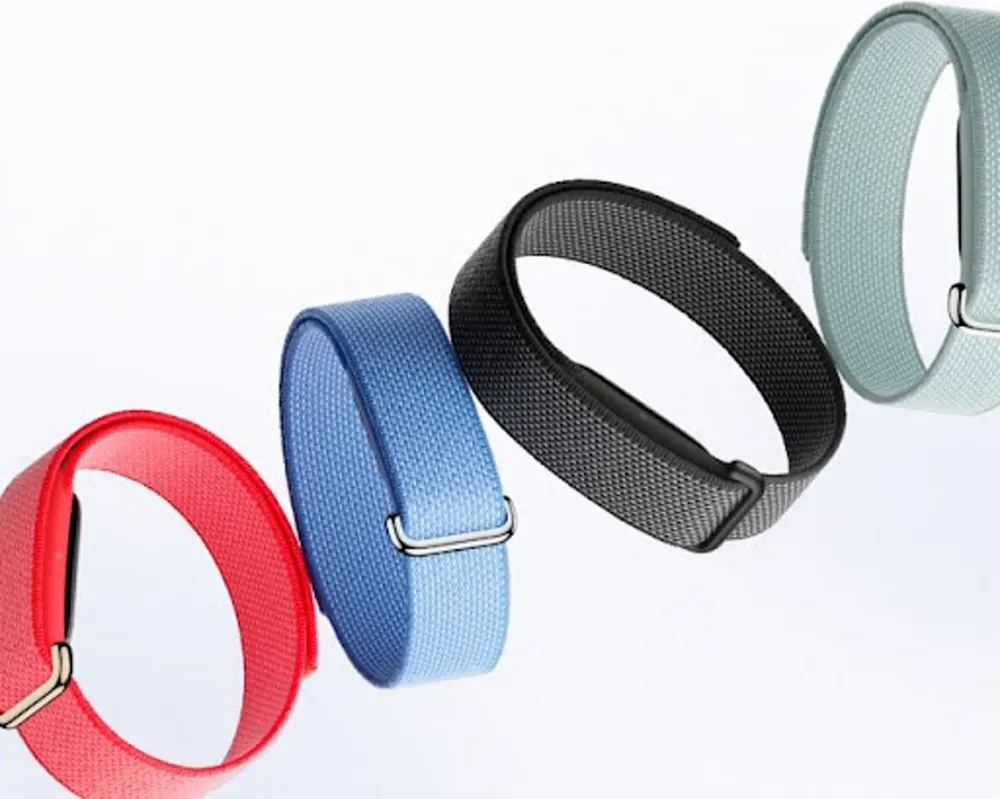
The Air's whole pitch is a band with nothing on it: no screen, no speaker, a small pod that's supposed to disappear on your wrist. That's also why the alarm is the feature people argue about. A silent buzz won't wake your partner. Some owners say it won't wake them either.
One thing up front. We don't own a Fitbit Air, so nothing here comes from us wearing one. It comes from Google's help pages, reviewers who did test it, and roughly 30 owner threads on r/fitbit and r/FitbitAir that we read through September 22. We read those through public Reddit archives, so a comment edited or deleted since then may read differently on Reddit today. Where owners disagree, we say so. Where nobody knows, we say that too.
- Setup: Google Health app, your Air's device page, Alarms, Add New Alarm. Then set vibration to High.
- Best use: a gentle first alarm, ideally with Smart Wake on.
- Not as your only alarm when there's a hard deadline (a shift, a flight, an exam). Owners disagree about how reliable it is, and nobody can prove why the misses happen.
- Two-alarm setup owners suggest: the silent alarm a bit early, a normal phone alarm at the time you truly must be up.
- Before you drop the backup: run a three-night test on mornings with nothing riding on them.
Does the Fitbit Air Have an Alarm?
Yes, but it's a specific kind of alarm. The Air has no speaker and no screen, so everything runs through a small vibration motor in the pod. Google's own Air page describes silent alarms with "a quiet vibration on your wrist."2 That's the appeal. It's also the risk, and we'll get to it.
Here's what's actually documented:
- How many: up to eight, according to DC Rainmaker, Gadgets & Wearables, BGR and Tom's Guide.3, 4, 5, 6 Google's alarm help page doesn't state a limit, so treat eight as reviewer-reported.
- What kinds: fixed-time alarms and Smart Wake alarms, one-off or on days you pick.1, 3
- Where they live: only in the Google Health app. Chrome Unboxed points out the Air's alarms are entirely separate from your phone's Clock app,8 and owners on r/FitbitAir grumble that there's no widget and no way to set one from Clock or Gemini.14
- What happens when one fires: the band vibrates and flashes, repeats the pattern several times, and tries again in 9 minutes if you don't dismiss it.1
How Do You Set a Fitbit Air Alarm?
Here are the steps, with the traps flagged. Menu names shift between app versions, so read the path as a rough direction. (If the Google Health app itself is new to you, our Fitbit-to-Google-Health explainer covers what changed.)
- Open the Google Health app with the band close to your phone. Google's steps for deleting an Air alarm say to keep the Air near your phone, and it's a sensible habit when you add one too.1
- Open your Air's device page and tap Alarms. Google's own pages call the area Device Management or Connections depending on the page.1 Owners describe finding the alarm setting in the Sleep tab, or behind the battery-percentage button on the home screen, and a few couldn't find it at all.4, 13, 14 If the Sleep tab has nothing, go through the device page.
- Tap Add New Alarm, pick the time and AM or PM, and confirm.1
- Choose Smart Wake or a fixed time. More on the difference below.
- Set the days and save. One-off or repeating.
- Go back and check that the alarm is in the list. With no screen on the band, the app list is the only proof the alarm exists. Several early owners report an alarm that said it saved and then never appeared, or alarms that vanished, or an "out of range" message while the band was connected.14 Look before you turn the lights off.
- Set the vibration strength. Tom's Guide puts it under Devices, your Fitbit Air, Device Preferences, Vibration Settings, and says it defaults to Low. BGR gives a slightly different route (Connections, Device Preferences, Vibration).5, 7 Switch to High. Neither Google help page we read documents this option, so we're leaning on reviewers here. One September thread reports the option missing on a US unit, and another owner says it appeared after reinstalling the app.14
What Is Fitbit Smart Wake, and Can It Make You Late?
Smart Wake is Google's name for a smart alarm. Google says it tries to find the best time to wake you starting 30 minutes before the time you set, avoids deep sleep, and if it can't find a good moment, the alarm goes off at your set time.1 Chrome Unboxed describes the same fallback, and Tom's Guide's reviewer says it can wake you up to 30 minutes early but never after.6, 8
Your set time is the latest Smart Wake should buzz you. Set 7:30 and you can be woken from 7:00. Some owners love that. Others are annoyed at losing half an hour, and a few wish the window were shorter. We didn't find a setting to shorten it, and we can't say whether one exists.
Can it make you late? By design, no. In the owner threads, sort of. One widely upvoted post from early August says a 7:30 Smart Wake alarm didn't go off until about 7:48, and the poster had been awake since around 6 without feeling anything earlier. The top reply pointed out that 7:30 plus two 9-minute repeats lands on exactly 7:48, and other owners in the thread said theirs works fine. Nobody settled it.13 That's a good example of the problem with this whole topic: two people looking at the same alarm can tell two different stories, and there's no log to check.
Does Smart Wake need a subscription? Nothing we found says so. Google's alarm page never mentions Premium, Google's Premium page lists Coach, fitness plans and video libraries instead, and the5krunner's review lists smart wake alarms under the free features.1, 9, 10 Google hasn't published a line saying "Smart Wake is free" in so many words, so we'd call that well supported but not confirmed.
How Strong Is the Fitbit Vibrating Alarm? Will It Wake a Heavy Sleeper?
It depends on the sleeper, and the reviewers say so themselves.
What reviewers say
DC Rainmaker says the buzz was strong enough to wake him, then adds that it "might vary by person."3 Tom's Guide's May review, by a self-described reasonably light sleeper, describes about 30 seconds of gentle vibration and a "non-startling" wake-up that didn't disturb a sleeping partner or the dog. It adds that the vibration may not be enough for people who sleep hard.6 Gadgets & Wearables says Low is the gentler option that may not be enough for everyone (the reviewer says it isn't enough for them), calls High the safer pick if the alarm has to do real work, and tells you to test it on a morning where missing it wouldn't hurt.4 A July Tom's Guide piece by a self-described deep sleeper says the default Low wasn't strong enough to wake her, and after she switched to High she was "definitely able to feel the alarm going off" on her wrist. She doesn't say it woke her every time.7
What owners say
Owner threads split about how you'd expect. In a thread asking how strong the alarm is, a good number of people say it wakes them without fail, and others say some days it does and some days they sleep through it.14 A separate thread from a buyer who picked the Air specifically for a silent alarm (he gets up early and doesn't want to wake his wife) says he never feels it, even on the strong setting.15 Owners don't even agree on what the buzz feels like: some describe a short three-pulse pattern repeated many times, some a single buzz and then another later, some about half a minute of gentle vibration. Nobody has timed it.
Does High fix it?
High is the first fix everyone suggests, and plenty of owners say it settled things. Others say they maxed it out and still slept through it, including one who calls themselves a heavy sleeper.13, 14 So treat High as a first step; nobody can promise it's enough.
Why some people feel nothing: fit and where you wear it
Google's fit guide says to wear the Air on top of your wrist, behind the wrist bone, with room for a pinky between band and skin, and no sliding or rotating.2 Several owners who wore theirs on the ankle say they felt little or nothing. One only felt the alarm fine after moving it to the wrist, and another says a loose band makes the buzz much harder to notice.14 If you're wondering what else changes off the wrist, we cover heart rate and sleep data in our Fitbit Air ankle-wear guide. For alarms the short version is simple: if you can't feel it, don't put it on your ankle. A couple of owners also say it took a few days before the buzz registered as a wake-up cue.14
Can You Trust the Fitbit Air Alarm as Your Only Alarm?
Here's what the owner threads add up to. We hand-sorted what people reported; treat it as a map, not a failure rate. Reddit isn't a random sample, and a count of comments can't tell you how often the alarm fails in the wild.
| What owners report | How big the group is | What nobody has shown |
|---|---|---|
| "It wakes me every time" | The largest single group | Whether it holds for deep sleepers |
| Too faint, slept through it, even on High | A sizeable minority | Whether it's sleep depth, fit, wear spot or the motor |
| Alarm never fired, or fired hours late | A handful of separate reports, some after weeks of working fine | Any log, video or sensor trace |
| Alarm unreliable after a time zone change | One or two reports | Any confirmation from Google |
| Alarm never saved, vanished, or "out of range" | Several early-owner reports | Whether it's fixed in newer app versions |
The one that worries people is the missed-work thread. A new owner, only a few days in, says the alarm showed as active for a 5:15 a.m. weekday schedule, the battery was above 60 percent, the band was snug, and sleep tracking recorded the whole night. They woke on their own nearly two hours after a 7 a.m. shift started. The most upvoted reply bets the vibration ran but wasn't strong enough, and plenty of replies blamed the owner for not running a backup. Later, a few other owners described mornings when they were sure they hadn't slept through it and the alarm never fired, some after weeks or months of it working, and one said theirs came about two hours late.13
Notice, too, that some owners who say the alarm works for them still stop short of trusting it alone. One says they feel it on High every day but wouldn't make it their primary alarm; another says it's strong enough most of the time but wouldn't stake an important flight on it.13, 14
That's the honest problem. A miss can mean two very different things. Either the band vibrated and it wasn't strong enough to rouse you (something you can partly fix with High, fit and wear spot), or the alarm didn't run at all (something you can't fix). Nobody has posted evidence that sorts one from the other, so from the outside we can't either. Firmware 253.2 began rolling out in late June, and Google's July 23 update instructions describe it as "minor bug fixes" with nothing about alarms. The owner who reported time zone trouble was already on that firmware.12, 14 We haven't found a Google statement either acknowledging or ruling out an alarm bug as of September 27.
Our call: use the Air as your first, gentle alarm, and keep a second alarm on a different device for any morning with a hard deadline. That's not because we know the Air fails; we don't, and plenty of owners say it never has. It's because the two mistakes cost different amounts. An unneeded backup costs you one extra buzz from your phone. A missing one has cost people a shift, a train, or a class.
How Do You Set Two Alarms So You Can't Oversleep?
Owners have landed on a few patterns. These are community setups. We haven't tried them, and Google doesn't recommend them:
- Silent alarm early, real alarm at the deadline. One reply in the missed-work thread suggests setting the silent alarm about ten minutes before you need to be up and a normal alarm for the moment you actually must be up. If the Air wakes you, you switch the other one off before it rings.13
- Smart Wake window that ends after the deadline. Another owner suggests setting Smart Wake so its window runs a little past the real deadline, with a regular phone alarm at the deadline. The Air gets first shot at waking you gently; the phone is the safety net.14
- Two Air alarms back to back. Some owners use the second one as a makeshift snooze. It helps if you dismiss the first and drift off. It does nothing if the vibration isn't waking you at all, because both run on the same motor.
That last point is the useful one. A backup only counts if it's a different device. Two Air alarms protect you from oversleeping one buzz, not from the band letting you down.
A setup we'd start with (we haven't tried it; it's built from those patterns): if you must be up by 7:30, set a Smart Wake alarm for 7:15 (window 6:45 to 7:15, with High vibration) and a normal phone alarm for 7:30. Because the Air's alarms are separate from your phone's Clock app,8 expect to switch off each one on its own; we found nothing saying the two sync.
The obvious objection: a phone alarm defeats the point if you bought the Air to avoid waking a partner. Fair. Turn the phone volume down and keep it on your side of the bed, or save the full two-alarm routine for the mornings that matter and run the Air alone on the ones that don't.
How Do You Test the Fitbit Air Alarm Before You Rely on It?
Pick three nights before mornings with nothing riding on them. Gadgets & Wearables says to test on a low-stakes morning, and BGR suggests running a phone alarm alongside for the first few days. The three-night count is ours.4, 5 Then:
- Set vibration to High and wear the band snug on top of your wrist, with a pinky's width of room.2
- Sync the app, then set the Air alarm the way you plan to use it (Smart Wake on, if that's the plan) for the time you'd like to be up.
- Set a normal phone alarm 10 to 15 minutes later as the net.
- In the morning, note three things: did the Air wake you before the phone did, was the alarm still in the app list, and did a double tap dismiss it on the first try?
- Score it. Three clean mornings, including at least one after a late or draining day, means the buzz is strong enough for you. One miss, or a "did I feel that or dream it?", means the phone stays as a co-alarm.
Now the caveat that matters. A clean three-night test tells you about strength, not about reliability. Some of the owners who report no-shows say the alarm had worked for weeks or months first.13 Passing means the buzz is enough to wake you. It doesn't prove the alarm will run every time. That's why we'd still keep a second alarm for a hard-deadline morning even after a perfect test, and drop it only for the mornings where being 20 minutes late costs you nothing.
Fitbit Air Alarm Not Working: What Should You Check?
Google doesn't publish a troubleshooting flow for Air alarms. This is a checklist assembled from its help pages and what owners report. Only the first item comes from Google; the rest are owner-reported and not confirmed as fixes.
- Keep the band near your phone when you add or change alarms (Google's Air steps say so for deleting them), then confirm the alarm is in the list and switched on.1 If it's missing, re-create it. Owners report alarms that vanish or won't save.14
- Check vibration is on High. If the option is missing, owners say updating or reinstalling the Google Health app brought it back.14
- Try a fixed-time alarm for a day with Smart Wake off. That tells you whether you're seeing the 30-minute window or an actual delay.
- Check fit and wear spot. Snug, on the wrist.
- Try the usual resets. Owners mention deleting and re-creating the alarm, reinstalling the app, and unpairing and re-pairing the band.14 For a band that has stopped responding, BGR says to put it on the charger and hold the charger's button for about 10 seconds to restart it.5 None of this is documented as an alarm fix.
- Charge it. Google's page says some Sense and Versa models won't fire alarms below 8 percent battery. That note doesn't list the Air, so we don't know its cutoff. A dead band can't buzz either way.1
- After changing time zones, recheck the alarm list and use a phone alarm. Owners report trouble, and we couldn't find a confirmed fix.14
- If it won't stop buzzing, one owner reported constant vibration that survived restarts and resets, and at least one other said they had the same problem. The original poster's own follow-up says it stopped after the battery ran flat and the band was plugged into and unplugged from the charger several times. That's one user's report and nobody has confirmed a fix, so contact Google Health support if it happens.14
How Do You Turn Off or Snooze the Fitbit Air Alarm?
Firmly double-tap the band while it's buzzing. Tom's Guide specifies the top of the tracker and says it works the first time about nine times out of ten.6 If you don't dismiss it, Google says the alarm snoozes and repeats after 9 minutes.1, 2 Owners are less kind: one new owner found it finicky on day one, and another says the only way they can stop it is to loosen the band and put it back on.14 Google documents no single-tap snooze, and a few owners would like one tap to snooze and two to dismiss. To stop an alarm from running at all, delete it in the Google Health app.1
What Can't the Fitbit Air Alarm Do?
- Make a sound. Vibration and a light only.
- Vibrate for anything else. BGR and the5krunner both say the Air doesn't buzz for calls or texts,5, 9 and owners say it doesn't buzz for step goals either.14
- Show you the time or the alarm. There's no display, so the app is your only confirmation.
- Hook into your phone's Clock app. Separate system, separate alarms.8
- Go beyond two vibration levels. Low and High are the only options reviewers describe. Tom's Guide's May review asked for an adjustable strength control with three levels, apparently before the Low/High option was widely noticed, and Gadgets & Wearables would like more patterns, including a more persistent one for heavy sleepers.4, 6
Who Should Skip the Fitbit Air for Its Alarm?
If you're a very deep sleeper, work early shifts, catch early flights, or need the alarm to work with zero backup, don't buy the Air for the alarm. It can still be the right tracker; it just shouldn't be the only thing standing between you and a missed 6 a.m. If the buzz is the deciding factor, read our Fitbit Air review for everything else it does, and see our sunrise alarm clock comparison for a bedside option that doesn't depend on your wrist. If you want light to do the waking, our Hatch Restore 3 review covers a sunrise alarm you snooze and switch off with buttons, though it needs Wi-Fi and wall power, so keep your phone alarm as a backup at first. If you'd rather look at another screenless band with its own smart wake alarm, our Garmin Cirqa review covers it, though owners in the r/Cirqa thread aren't unanimous about its buzz either.15
If you're buying it for sleep tracking and a gentle wake-up on ordinary mornings, the alarm is a nice extra and the two-alarm setup above covers the mornings that matter.
Fitbit Air Alarm FAQ
Does the Fitbit Air have an alarm?
Yes. It's a silent, vibration-only alarm you set in the Google Health app. The band has no speaker and no screen, so it buzzes on your wrist, flashes its status light, and repeats after 9 minutes if you don't dismiss it. Reviewers report room for up to eight alarms.
How do I set an alarm on my Fitbit Air?
Open the Google Health app with the band nearby, go to your Fitbit Air's device page, tap Alarms, then Add New Alarm. Pick a time, choose Smart Wake or a fixed time, set the days and save. Menu names vary by app version, and the band has no screen, so check the alarm list in the app afterward to confirm it saved.
Will the Fitbit Air alarm wake a heavy sleeper?
Owners disagree. Many say it wakes them every time, especially with vibration set to High, while others say they slept through it even on the strongest setting. Reviewers note it may not be enough for very deep sleepers. Test it on low-stakes mornings and keep a phone alarm for anything you can't miss.
How do I turn off the alarm on my Fitbit Air?
Firmly double-tap the band while it's vibrating. If you don't dismiss it, Google says the alarm repeats after 9 minutes. Google documents no single-tap snooze. To stop an alarm from running at all, delete it in the Google Health app.
My Fitbit Air alarms aren't working. What can I do?
Check that the alarm is actually saved in the app's alarm list, set vibration to High, and try a fixed-time alarm instead of Smart Wake to rule out the 30-minute window. Make sure the band is snug on your wrist and close to your phone when you edit alarms, then try restarting the app or phone or re-pairing the band. Those steps come from owner reports and none is a Google-confirmed fix, so keep a phone alarm as backup while you sort it out.
What is Fitbit Smart Wake?
Smart Wake is an alarm option that tries to wake you at a lighter point in your sleep, starting up to 30 minutes before the time you set. If it can't find a good moment, Google says the alarm goes off at your set time. We found nothing saying it needs a Premium subscription, and the5krunner lists it among the free features, but Google doesn't spell that out.
How many alarms can the Fitbit Air have?
Up to eight, according to DC Rainmaker, Gadgets & Wearables, BGR and Tom's Guide. Google's alarm help page doesn't list a limit, so treat this as reviewer-reported; Google hasn't confirmed it.
Can I set the Fitbit Air alarm from my phone's Clock app or Gemini?
Based on what reviewers and owners report, no. The Air's alarms live in the Google Health app and are separate from your phone's Clock app. Owners also say there's no widget and no voice-assistant shortcut.
Does the Fitbit Air alarm work without my phone nearby?
We couldn't confirm it. Google's Air steps tell you to keep the band close to your phone when you delete alarms, which covers managing them; they don't say whether alarms fire without the phone. One review says a small on-device model handles Smart Wake, which hints the band doesn't need a live phone connection overnight, but that's an inference.1, 9 A thread on Google's own community forum is titled as a complaint that the alarm feature can't be used because of connectivity even with the band next to the phone; we could only load the title, not the replies.16 Set alarms with the band beside your phone, and don't rely on it without a backup when you travel.
Does the Fitbit Air alarm work after a time zone change?
Unconfirmed. One traveling owner reports that even a one-hour change threw the alarm off despite syncing the band first.14 Google's firmware 253.2 note says only "minor bug fixes."12 After changing time zones, check the alarm list and use a phone alarm as backup.
Can I wear the Fitbit Air on my ankle and still feel the alarm?
Several owners who wore it on the ankle say they felt little or nothing, and one felt it fine after moving the band to the wrist. Google only documents wrist wear. Our ankle-wear guide covers what else changes.
What does the Fitbit Air do besides alarms?
It's a screenless tracker for sleep, heart rate, steps and activity, with about a week of battery, and it works without a subscription. Google Health Premium is optional.11 See our Fitbit Air review for the full breakdown.
Sources
- Google Health Help Center: Manage alarms on your Fitbit device. Smart Wake definition and 30-minute window, dismiss and 9-minute repeat, keep the Air near your phone when deleting an alarm, 8 percent battery note for some Sense and Versa models. The page gives no alarm limit and no Air-specific troubleshooting.
- Google Health Help Center: Get started with Google Fitbit Air. Silent alarms set in the Google Health app, quiet vibration, firm double tap, fit guidance.
- DC Rainmaker: Fitbit Air In-Depth Review (May 2026). Up to eight alarms, manual and smart alarms, 9-minute snooze, vibration "strong enough to wake me" with the note that it may vary by person.
- gadgetsandwearables: I tried Fitbit Air alarms and the High setting makes the difference (June 2026). Low and High vibration, up to eight alarms, advice to test on a low-stakes morning; the reviewer says Low isn't enough for them.
- BGR: This Hidden Fitbit Air Setting Is A Total Game-Changer (July 2026). Vibration setting route, up to eight alarms, no vibration for phone calls and messages, advice to run a phone alarm alongside for the first few days, restart steps for an unresponsive band.
- Tom's Guide (via Yahoo Tech syndication, May 30, 2026): The Fitbit Air has totally changed the way I start my day. About 30 seconds of vibration, up to eight alarms, firm double tap on the top of the tracker (works the first time roughly nine times in ten), Smart Wake up to 30 minutes early but never after, and a request for an adjustable strength control with three levels.
- Tom's Guide: I'm a deep sleeper, and I wish I'd found this hidden Fitbit Air setting weeks ago (July 5, 2026). Default Low vibration, the Device Preferences route to High, and the writer's report that Low wasn't strong enough to wake her while High was "definitely" noticeable.
- Chrome Unboxed: The Fitbit Air's silent alarm has been a game-changer for my morning routine (August 2026). Smart Wake fallback to the set time, alarms separate from the phone's Clock app, no notification vibrations.
- the5krunner: Fitbit Air Review (May 2026). Smart wake alarms listed among free features, on-device model for Smart Wake, vibration motor does not relay calls or texts.
- Google Health Help Center: Sign up or manage your Google Health Premium subscription. Premium features listed (Coach, plans, video libraries); Smart Wake and alarms are not among them.
- Google: Introducing the new Google Fitbit Air. Up to a week of battery, five-minute fast charge, Premium trial and optional subscription.
- 9to5Google: Google rolls out first Fitbit Air firmware update (July 23, 2026). Firmware 253.2 began rolling out in late June and more widely on July 13; Google published update instructions on July 23 and described it as "minor bug fixes."
- r/fitbit owner threads (paraphrased, not quoted): missed shift a few days after buying (May 25); Smart Wake alarm that an owner says fired around 7:48 (August 7); does it wake heavy sleepers (June 3).
- r/FitbitAir owner threads (paraphrased, not quoted): how strong is the alarm (July 24); weak buzz, ankle wear, finicky double tap (September 11); no vibration until moved off the ankle (July 22); alarm trouble after time zone changes (August 2); alarm tab missing after reinstall and reset (June 17); constant vibration that survived resets (August 14); alarm setting hard to find (August 18); alarms disappeared (July 28); vibration option missing on a US unit (September 5).
- r/Cirqa owner thread (paraphrased): an Air owner comparing alarm vibration with the Cirqa (August 25).
- Google Health Community: thread on the alarm feature and connectivity. We could load only the title, not the replies, so we draw no conclusion from it beyond noting it exists.